Printora
FREE • NO ACCOUNT • ZERO CLOUD STORAGE

Print from your phone.
Leave no trace.

Print from any phone or browser to the printer on your Windows PC, at home or away. Files are encrypted in transit and deleted the moment they print.

LIVE JOB • invoice_0412.pdfTLS + AES-256
=
PHONE
ENCRYPTED
YOUR PC
FILE SHREDDED • 0 BYTES STORED
No account needed
AES-256 + TLS
Certificate pinning
No tracking or telemetry
Zero cloud storage
Free to use
No account needed
AES-256 + TLS
Certificate pinning
No tracking or telemetry
Zero cloud storage
Free to use
No account needed
AES-256 + TLS
Certificate pinning
No tracking or telemetry
Zero cloud storage
Free to use
Universal Hardware Compatibility

Works with any printer recognized in your Windows Settings & Control Panel.

HP LaserJet & DeskJet
Printer OEM
Brother HL / MFC Series
Laser & Ink
Canon imageCLASS & PIXMA
Printer OEM
Epson EcoTank & WorkForce
Ink Tank
Zebra ZD / GK Thermal
Barcode / POS
Ricoh & Kyocera Office
Enterprise MFP
Xerox VersaLink
Office Workgroup
Windows 11 & Windows 10
Host OS
Android 15 / 14 / 13
Mobile App
iOS 18 / iPadOS Safari
QR Web Print
Pantum & Lexmark Pro
Desktop Laser
HP LaserJet & DeskJet
Printer OEM
Brother HL / MFC Series
Laser & Ink
Canon imageCLASS & PIXMA
Printer OEM
Epson EcoTank & WorkForce
Ink Tank
Zebra ZD / GK Thermal
Barcode / POS
Ricoh & Kyocera Office
Enterprise MFP
Xerox VersaLink
Office Workgroup
Windows 11 & Windows 10
Host OS
Android 15 / 14 / 13
Mobile App
iOS 18 / iPadOS Safari
QR Web Print
Pantum & Lexmark Pro
Desktop Laser
100% Local-First
Documents never leave your network
< 1.2s Fast Path
Zero-latency peer-to-peer Wi-Fi
Windows 10 & 11
Lightweight .NET 8 native host
No Subscription
Free, unthrottled personal printing
Powerhouse Capabilities

Engineered for Precision & Complete Privacy

Everything your mobile phone needs to command Windows print spoolers with zero latency.

Live Windows Spooler Queue

Direct Win32 GDI job control • Pause, reprioritize, or cancel on the fly

Contract_Signed_2026.pdf
4 pages • Printing
TOP PRIORITY
Architectural_Plan_A3.pdf
12 pages • Queued
Tax_Receipt_April.png
1 pages • Queued
Windows Spooler Service: HEALTHYMemory Footprint: 38.4 MB

Zero-Cloud Privacy Vault

Your medical files, contracts, and banking sheets never pass through a cloud server.

In-Memory Spooling: Payload streamed straight into RAM buffers.
Auto-Shred Temp Files: Zero persistent copies left on host disk.
Zero Cloud Telemetry: No account required, no file analytics logged.
✓ Compliant with strict enterprise airgap privacy

On-Device OCR & Text Extraction

Scan receipts, bills, and contracts. Convert scanned images to selectable text locally.

Extracted Text (Tesseract Engine)
INVOICE #94021
TOTAL: $142.50
DATE: OCT 08, 2026
STATUS: PAID VIA ACH
VENDOR: PRINTORA SYSTEMS
Confidence Score: 99.4% • 100% Offline Processing

Hardware Compatibility Explorer

Search 4,000+ printers supported through the native Windows Spooler

HP LaserJet Pro MFP 4101(Laser MFP)
Fully Compatible
Brother HL-L2350DW Compact(Monochrome)
Fully Compatible
Epson EcoTank ET-2850(Ink Tank)
Fully Compatible
Canon imageCLASS MF445dw(Laser MFP)
Fully Compatible
Zebra ZD421 Direct Thermal(Barcode Label)
Fully Compatible
Kyocera ECOSYS M2540dw(Heavy Duty)
Fully Compatible
Ricoh IM C2000 Color MFP(Workgroup)
Fully Compatible
Generic Windows USB Printer(Any USB)
Fully Compatible
Supports USB, Wi-Fi, Ethernet, Bluetooth & Network SharesRule: If Windows can print, Printora can print.
Setup & Architecture

How Printora Works

From download to your first printed page in less than two minutes. Zero cloud accounts required.
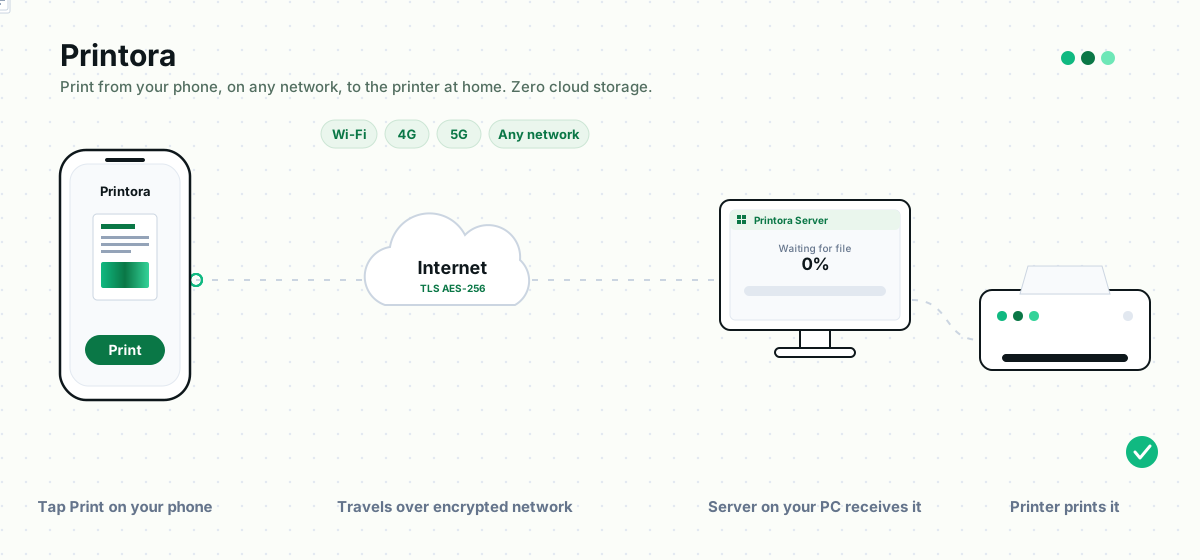
Live Data Pipeline • Direct Device Spooling
Local Wi-Fi or 4G/5GIn-Memory DecryptionAuto-Purge & Shred
Printora Live Workflow: Phone to Encrypted Network to Windows PC to Printer

Install Printora Server

Download and run the lightweight .NET 8 application on your Windows 10 or 11 PC. It automatically enumerates your connected printers.

Connect Your Phone

Android discovers the PC automatically over Wi-Fi. iPhone and browser users simply scan the QR code displayed on the Windows host.

Pick or Scan a Document

Choose an existing PDF or photo, or use the built-in mobile camera scanner to capture paperwork, receipts, or both sides of an ID card.

Print & Control Spooler

Set copies, color, duplex, and page range. Track live spooling progress on your phone and the Windows host in real time.

Workflow Evolution

Traditional Workflow vs. Printora

See how Printora replaces slow, multi-step workarounds with a clean, unified local-first architecture.

Task
Traditional Methods
With Printora
Sending a file to print
Emailing files to yourself, uploading to USB drives, or logging into PC
Send directly from Android app or scan a QR code from any browser
Scanning documents
Purchasing a bulky flatbed hardware scanner or separate scanner app
Built-in phone camera scanner with auto edge detection, OCR, and filters
Scanning identity cards
Manual photo editing, resizing, or printing front & back on separate sheets
Automatic dual-side layout combined onto a single standard A4 page
Checking printer status
Walking across the room to check paper trays and blink codes
Live desktop telemetry for toner levels, paper status, and errors
Print queue management
Jobs get stuck in Windows spooler with no priority or pause controls
Interactive queue with pause, resume, priority boost, cancel, and reorder
Remote printing
Complex router port forwarding, static IP costs, or cloud print subscriptions
Zero-port Cloudflare Tunnel integration protected with PIN & rate limits
Document privacy
Third-party cloud print servers store and log your confidential files
Local-first host. Zero permanent cloud copies. Auto-cleanup of temp uploads
Frequently Asked Questions

Everything you need to know about Printora.

Clear, honest answers about compatibility, security, network paths, and supported devices.

Yes. The native Printora Android app (built with Kotlin and Jetpack Compose for Android 8.0+) connects over local Wi-Fi to the Printora server on your Windows 10/11 PC. It supports printer discovery via mDNS and UDP beacons, full print settings (copies, color/B&W, paper size, duplex, quality), and document preview.
Local-First • Privacy-First Architecture

Your printer is already connected. Make it available from your phone.

Print documents. Scan paperwork. Create PDFs. Manage your printer. Use Web Print. Print remotely when you need it.

Privacy-first printing built around your own devices.