Mobile Document Camera Scanner
Capture physical paperwork, receipts, invoices, contracts, and study notes with hardware-accelerated computer vision. Zero bulky flatbed hardware required.
Turn your phone into a document scanner.
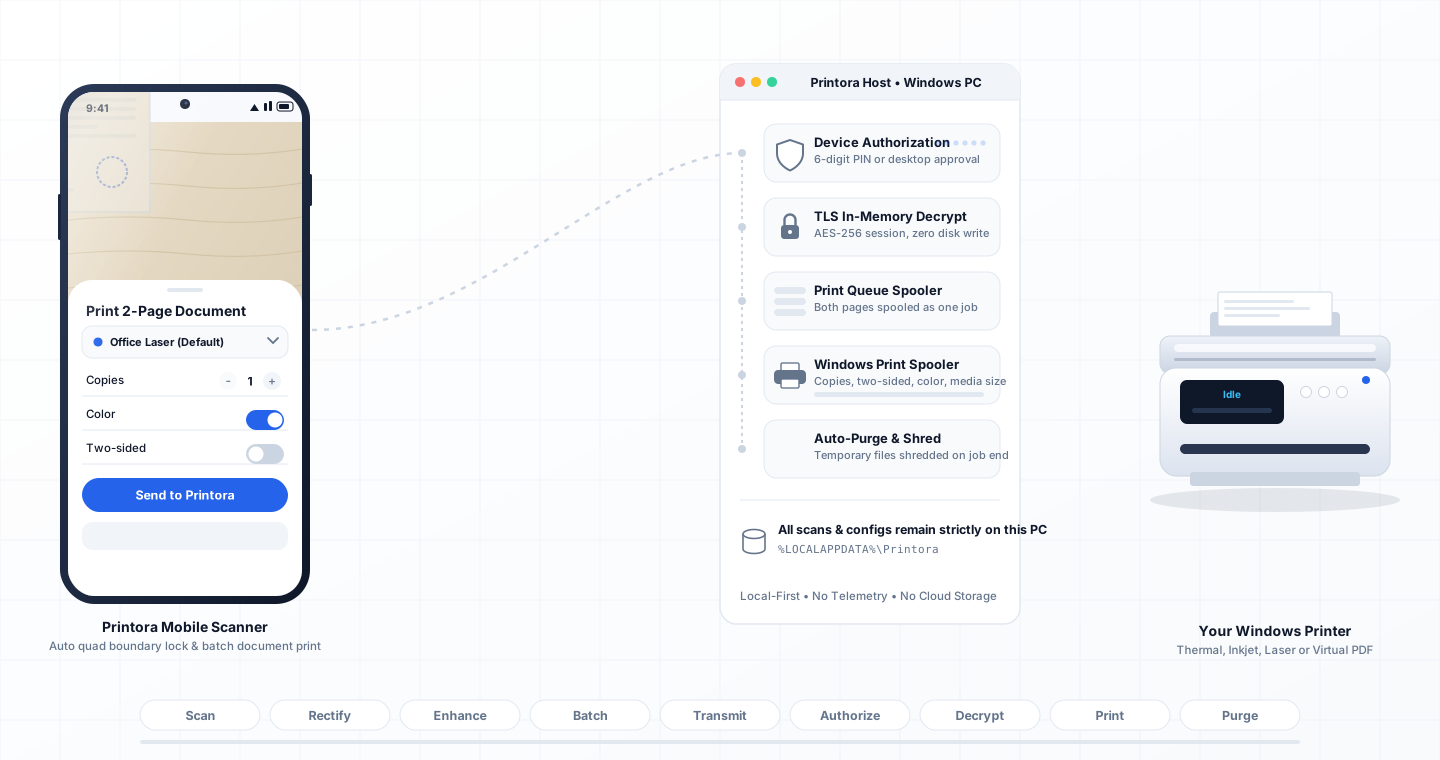
Scan. Clean. Create a PDF. Print.
Built-in camera scanner with automatic quad edge detection, perspective correction, filter enhancements, and direct scan-to-print. Supports up to 20 pages per document.
Auto Quad Edge Boundary Lock
Real-time OpenCV contour detection isolates documents on desks, crops background clutter, and corrects keystoned perspective angles.
Adaptive Text Enhancement
Remove cast shadows, boost character contrast, and flatten crumpled page lighting using on-device binarization and sharpening filters.
Direct Scan-to-Print Pipeline
Skip intermediate file exports. Stream captured vector pages directly to the Windows print host for immediate physical output.
On-Device Computer Vision Pipeline
Standard smartphone photo captures suffer from keystoning (trapezoidal distortion), uneven ambient shadows, and background surface clutter. Printora addresses these artifacts by executing an entirely local image processing pipeline:
Real-Time Edge Detection
Evaluates camera viewfinder frames to identify closed polygon contours, locking onto document borders instantly when paper is detected.
Perspective Rectification
Applies a 4-point homography transform, converting tilted handheld shots into perfectly orthogonal flatbed scans.
Adaptive Photocopy Filter
Suppresses paper bleed-through, removes finger shadows, and normalizes background paper color to crisp printable white.
Document Scanner Technical Specifications
| Maximum Pages per Document | Up to 20 pages per unified session |
| Output Resolution | Up to 300 DPI print quality (standard A4 / Letter) |
| Processing Engine | 100% on-device Android CameraX & OpenCV-accelerated pipeline |
| Image Filters | Magic B&W Photocopy, Enhanced Color, Grayscale, Original Photo |
| Direct Print Integration | One-tap wireless transmission to Windows print spooler |
| Privacy Guarantee | Zero remote cloud transmission; temporary buffers purged on completion |
Document Scanner Feature FAQ
Detailed answers on computer vision models, manual crop nudging, and batch PDF generation.